Power Delivery & Sensors

Fewer Cables, Better Fit

Tidying up cords around a nightstand or kitchen counter shouldn't mean trading fast charging for hot inductive coils or replacing fifteen coin-cell batteries every winter.

COMPARE EVERYDAY USES
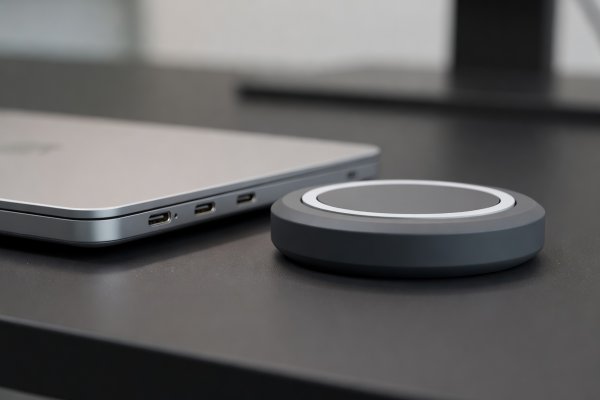
Shallow depth-of-field close-up of USB-C Power Delivery ports beside a weighted Qi2 magnetic charging puck
Cord & Battery Audit

When wireless helps—and when a single braided USB-C cable wins

Inductive wireless charging is convenient on a nightstand where you drop your phone in the dark, or on an entryway tray where earbuds rest between errands. However, older flat Qi pads suffer from coil misalignment: set a phone down 6 millimeters off-center and charging efficiency plummets to 55%, turning the lost energy directly into heat that degrades lithium-ion battery health over two years.

If you use wireless charging, stick strictly to Qi2 (which uses a ring of permanent magnets to lock the coils into exact alignment at 15W) or use a desktop GaN (Gallium Nitride) charging block anchored under the desk edge with weighted silicone cable clips. One 100W GaN block fed by a single figure-8 AC cord replaces four separate laptop, tablet, flashlight, and phone wall bricks.

Wired USB-C PD 3.1 Efficiency89%–93% wall-to-battery
Qi2 Magnetic Alignment75%–80% efficiency; 6°C cooler than flat Qi
Misaligned Flat Qi Pad50%–62% efficiency (high thermal stress)
Recommended Cable SpecUSB-IF Certified 100W/240W e-Marked Braided Silicone

Comparing wireless accessories and battery-powered home sensors

Accessory Type Standard / Protocol Power Source Real-World Quirk Best Placement
4-Port Desktop GaN Station USB-C PD 3.0 / PPS (100W–140W total) Detachable C7 figure-8 AC cord (stays flat in wall) Brief 1-second power renegotiation drop when plugging in a second device Home desk, kitchen counter command shelf, travel bag
Weighted Qi2 Nightstand Stand WPC Qi2 MPP (15W magnetic) 30W USB-C PD wall adapter Light plastic stands lift off the table with the phone unless base weighs >350g Bedside table (enables horizontal low-glare night clock)
Under-Sink Water Leak Puck Zigbee 3.0 or LoRa (Sub-GHz) 2× AAA Alkaline or CR123A (3–5 year life) Also include a built-in 85 dB local piezo siren in case hub is offline Under kitchen sink trap, behind washing machine, water heater pan
E-Ink Temp & Humidity Monitor BLE (BTHome) or Zigbee / Thread CR2450 or 2× AAA (12–24 months) High-contrast e-paper screen is readable across the room with zero backlight glare Baby nursery, guitar/piano room, damp basement, greenhouse
Battery Standardization

Ban exotic coin cells from your sensor drawer

Before buying wireless contact sensors, scene buttons, or temperature monitors, check what battery is inside. A sensor that takes standard AAA cells (like ThirdReality Zigbee sensors) or common CR2450 coin cells runs two to three times longer than ultra-thin sensors using tiny CR1632 or CR2016 cells. Better yet, standardizing your household on two battery sizes means you aren't hunting for specialty blister packs when a leak sensor chirps at 10 PM.

Top Capacity Pick2× AAA (1200 mAh) or CR123A (1500 mAh)
Compact Coin PickCR2450 (600 mAh vs 220 mAh in CR2032)
Multi-Port Quirk

Understanding USB-C port renegotiation pauses

Almost all multi-port GaN chargers dynamically split their wattage across ports. When your laptop is charging on Port C1 and you plug your phone into Port C2, the charger briefly interrupts power for 0.8 seconds to negotiate a new 65W + 30W split. That pause doesn't matter for battery-backed laptops or phones, but if you power a Raspberry Pi, Home Assistant hub, or portable monitor from that same block, the brief drop will reboot it. Always use a dedicated fixed-output port for hub hardware.

Safe for Battery DevicesPhones, tablets, laptops, camera batteries
Needs Fixed PortMini PCs, Zigbee hubs, external SSD enclosures

Setup notes for wireless accessories and sensors

Why wall-wart GaN chargers sag and fall out of worn outlets
High-wattage GaN chargers pack heavy transformers into a tiny cube. When plugged directly into a vertical wall receptacle—especially older US NEMA 5-15 outlets with loose brass prongs—the leverage of a stiff USB-C cable pulls the brick partially out of the wall, creating an arcing hazard. For anything over 65W, choose a desktop block with a detachable AC power cord that rests flat on the furniture.
How to keep Zigbee and Thread sensors from dropping off the mesh
Battery-powered sensors sleep 99.9% of the time and cannot repeat signals for other devices. Their reliability depends entirely on having mains-powered routing nodes (smart plugs or hardwired wall switches) evenly spaced between the hub and the far corners of the house. Adding just two mains-powered Zigbee or Thread plugs in central hallways dramatically extends sensor battery life and prevents dropped check-ins.